Dial
Why I vibed it
I have a little aluminum macropad on my desk — four keys and a knob. Out of the box it controlled music: knob for volume, keys for play/pause and skipping tracks. Handy, but I wanted it to do more than one thing. So I vibed Dial: one key becomes a mode switch, and everything else changes meaning depending on the mode I'm in.
What it does
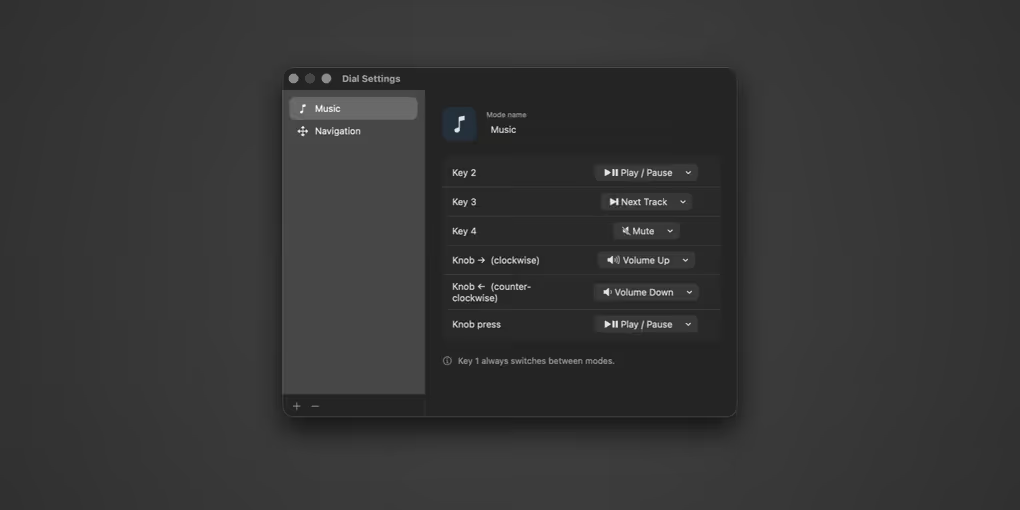
Dial lives in the menu bar. Press the mode key to cycle through your modes — a HUD fades in to show which one you're in, and the menu-bar icon updates to match. In each mode, the other keys and the knob (turn and press) can be bound to whatever you like:
- Media — play/pause, next, previous, mute, volume up/down
- Navigation — arrows, return, escape, tab, space, page up/down, home/end
- Launch App — open any application
You build and edit modes in a settings window, and they're saved between launches. Two ship by default: Music (knob = volume) and Navigation (knob = up/down, knob-press = enter).
The device
I built this for an aluminum 4-key macropad with a rotary knob, which I picked up on Etsy here. Any VIA-programmable macropad with keys and an encoder will work — Dial listens for a set of otherwise-unused keys (F13–F19) that you map the pad's controls to in usevia.app.
How I use it
Music mode for the everyday volume/skip controls, and a Navigation mode for stepping through lists and dialogs without reaching for the arrow keys. Adding a mode that launches my most-used apps straight from the knob is next.
Changelog
v2026.07.24 — July 24, 2026
- Initial release